My Journey to the Cloud
My Journey through the AWS Cloud Resume Challenge.

DevOps & Solutions Architect
Senior Site Reliability Engineer focused on AWS, platform engineering, automation, and secure cloud architecture.
Most of the time, learning tech feels like trying to put together a puzzle without seeing the picture on the box. You learn a bit of Python here or a bit of networking there, but you rarely get to see the whole "big picture" of how a single click on a browser travels across the globe to a database in some far-off data center.
That's exactly why I decided to tackle the AWS version of the Cloud Resume Challenge. Created by Forrest Brazeal, this isn't just another "follow-the-leader" tutorial; it's a total baptism by fire. It forced me to stop thinking about things in question and answer format and to actually create something that was long lasting and useful to me. While I did use the challenge steps as a rough guide, the steps I ended up taking were a bit different, but I feel I still ended up at the same destination. Anyways, this post is a map of that journey, from my first messy manual steps to a fully automated system I built myself.
The Project Roadmap
I've broken my documentation into five distinct phases. If you're looking for the "how-to" behind the high-level concepts, the links below will take you to my detailed, service-by-service breakdowns.- Phase 1: Building the Foundation
Before I could even think about the cloud, I had to get my own house in order. This phase wasn't about complex automation yet; it was about getting comfortable with the tools of the trade. I spent this time learning how to navigate Visual Studio Code, moving away from basic text editors to a setup that actually felt professional. The real challenge here was a deep dive back into HTML and CSS. I had to relearn the building blocks of the web, experimenting with different designs and merging elements from various sites until I found a look that felt cohesive and, more importantly, felt like me.
Phase 1 Detailed Guide: VS Code Workflow - Phase 2: Going Live Globally
The goal here was simple: put my resume online. The execution, however, was a lesson in global networking. I used Amazon S3 to host the static files, but a bare bucket isn't secure or fast enough for a professional site. I then moved into the networking side of AWS, using Route 53 to manage my custom domain and wrapping the whole site in Amazon CloudFront. This wasn't just about speed; it was a deep dive into how HTTPS and SSL certificates actually work to keep a site secure.
Phase 2 Detailed Guides: AWS S3 Hosting | Route 53 Domain | CloudFront HTTPS - Phase 3: CI/CD & Cloud Hygiene
In the professional world, you don't manually upload files; you use a pipeline. I set up GitHub Actions so that every time I save my code, it automatically runs my tests and deploys itself to AWS. I also took a hard look at the "Cloud Hygiene" of my project-setting up AWS Budgets and monitoring to ensure my cloud journey didn't result in a surprise bill.
Phase 3 Detailed Guides: GitHub CI/CD | Cost Optimization - Phase 4: The Serverless Back-End & Integration
This is where the "magic" happens—and where the real frustration began. I needed a way to track visitors without running a traditional server. I built a serverless stack using DynamoDB and AWS Lambda (Python), connected to the world via the modern Amazon API Gateway HTTP API. This wasn't a "one and done" setup. I was testing and breaking things the whole time. I ended up moving away from the common "copy-paste" code I found in tutorials, rewriting my integration to be more secure and robust. Dealing with CORS (Cross Origin Resource Sharing) was a brutal lesson in web security, but it forced me to understand exactly how browsers and APIs communicate under the hood.
Phase 4 Detailed Guides: DynamoDB | Lambda | API Gateway - Phase 5 - Completing the Cloud Resume Challenge
The final core phase focused on the serverless backend that turns a static site into a dynamic cloud app: Lambda + DynamoDB visitor counting behind an HTTP API, wired into the frontend.
Infrastructure as Code with Terraform is the next evolution of this project. Today the live stack is still provisioned and updated through AWS console work, CLI helpers, and GitHub Actions. I am documenting and starting the Terraform migration so hosting, APIs, and data stores can be versioned and reproduced as code — without rebuilding production from scratch.
At this point the site includes static hosting, global HTTPS delivery, automated deployments, serverless APIs, and a contact form extension. Terraform IaC is actively in progress.
Phase 5 guide (roadmap): Terraform migration — in progress -
Phase 6 - Extending the Project Beyond the Challenge
After completing the official challenge requirements, I began expanding the project with additional features to further develop my cloud engineering skills. Rather than simply stopping once the challenge was finished, this phase focuses on building new capabilities using the infrastructure already in place.
The first extension is a serverless contact form in the site footer. Visitors submit name, email, and a message; the frontend posts to the cloud-resume-api HTTP API, which invokes Lambda, stores the message in DynamoDB, and can email via SES once identities are verified.
API code lives in its own repository so the website repo stays focused on the Vite frontend while the contact backend can be deployed independently. Full write-up: Serverless Contact Form.
-
Phase 7 - Serverless CRUD with Terraform
I extended the serverless work with a separate CRUD application. It exposes REST-style endpoints through API Gateway, runs create, read, update, and delete logic in Lambda, and stores application records in DynamoDB.
Infrastructure is managed with Terraform for repeatable deployments. View the full CRUD project details →
-
Phase 8 - S3 Security Challenge
I hardened a deliberately vulnerable S3 bucket by removing public access, restricting reads to a Lambda execution role, enforcing HTTPS, and enabling encryption at rest. The exercise made defense in depth and least privilege concrete through hands-on testing.
Phase 8 guide: Secure the Bucket -
Phase 9 - Authenticated Employee Management
I extended the serverless architecture into an authenticated business application. Cognito protects the user experience, API Gateway routes requests to five Python Lambda CRUD functions, and DynamoDB stores encrypted employee records. CloudFront, CloudWatch, and SNS complete the delivery and operational layers.
Phase 9 guide: AWS Employee Management Application
High-Level Architecture
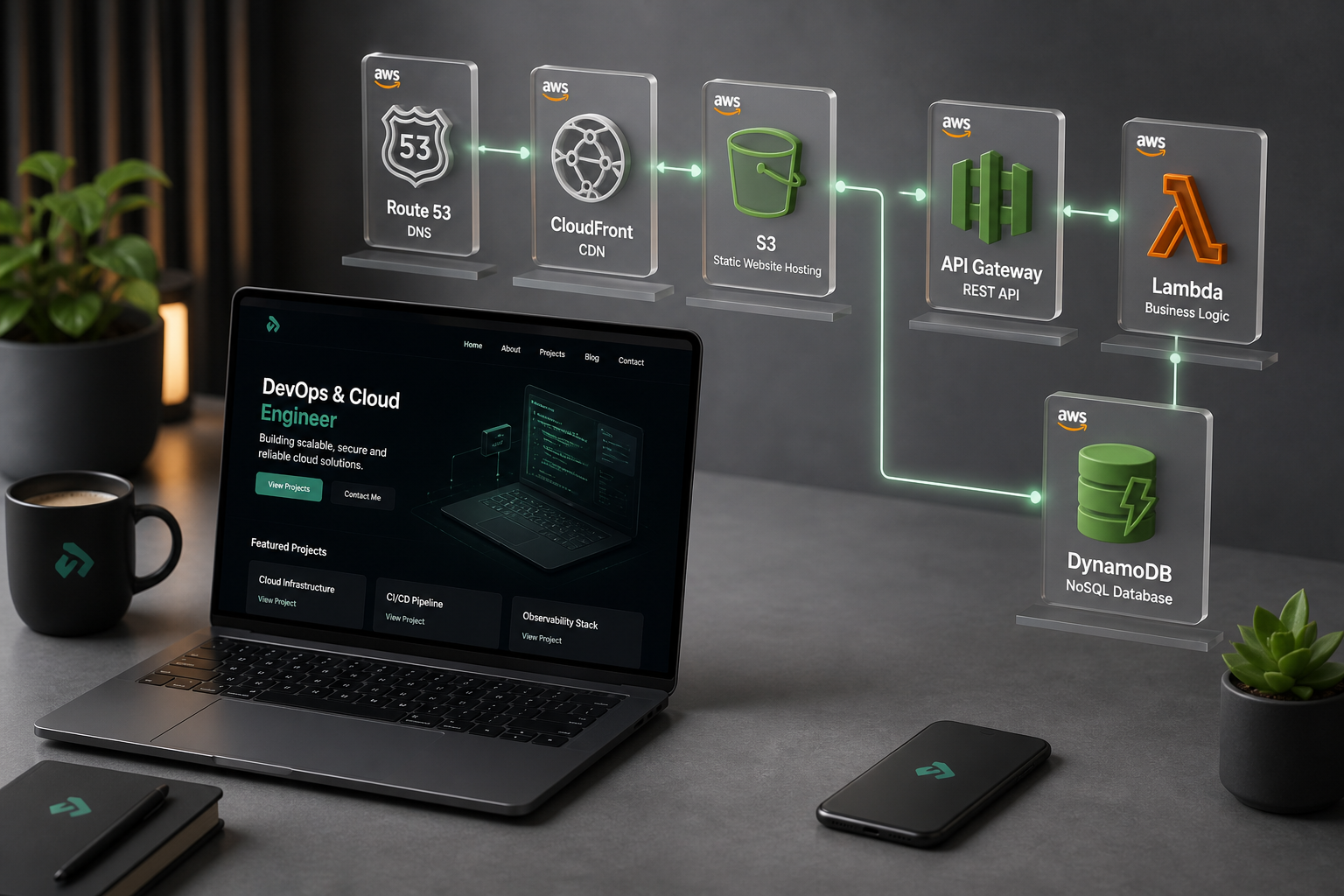
My architecture follows a standard “Serverless Three-Tier” pattern:The Edge Layer: When you visit khansaiful.com, Route 53 directs you to a CloudFront edge location. This ensures the site loads instantly, whether you're in New York or Tokyo.
The Logic Layer: As the page loads, JavaScript sends a request to the API Gateway (HTTP API). This triggers an AWS Lambda function—a piece of “serverless” Python code that wakes up just long enough to process the visit.
The Data Layer: The Lambda function talks to DynamoDB, retrieving and incrementing the visitor count before sending the number back to your screen.
Why This Project Matters
I wanted to move beyond abstract certifications. This project was my chance to prove that I can handle the actual friction of modern technology:Troubleshooting: I spent hours staring at “Access Denied” screens until I truly understood IAM policies.
Security: I followed the “Principle of Least Privilege,” ensuring my code only has the exact permissions it needs to run.
Modern Thinking: I opted for the HTTP API, proving I can evaluate technical trade-offs based on cost and performance rather than just following old tutorials.
Resilience: With CI/CD already in place and Terraform IaC in progress, this resume is becoming a living, automated piece of infrastructure — not just a static page.
Where I am now: I am working through the Terraform migration so the live AWS environment can be managed as code. Follow along as manual ClickOps becomes reproducible IaC.See my full skills and certifications on the Resume page.
Official AWS reference: Hosting a static website using Amazon S3