S3 Security Challenge
Progressively hardening a vulnerable bucket with AWS security controls
This hands-on challenge started with a deliberately vulnerable Amazon S3 bucket containing sensitive sample data. The goal was to understand how an exposed bucket can be abused, then apply layered controls until only the intended application can read it securely.
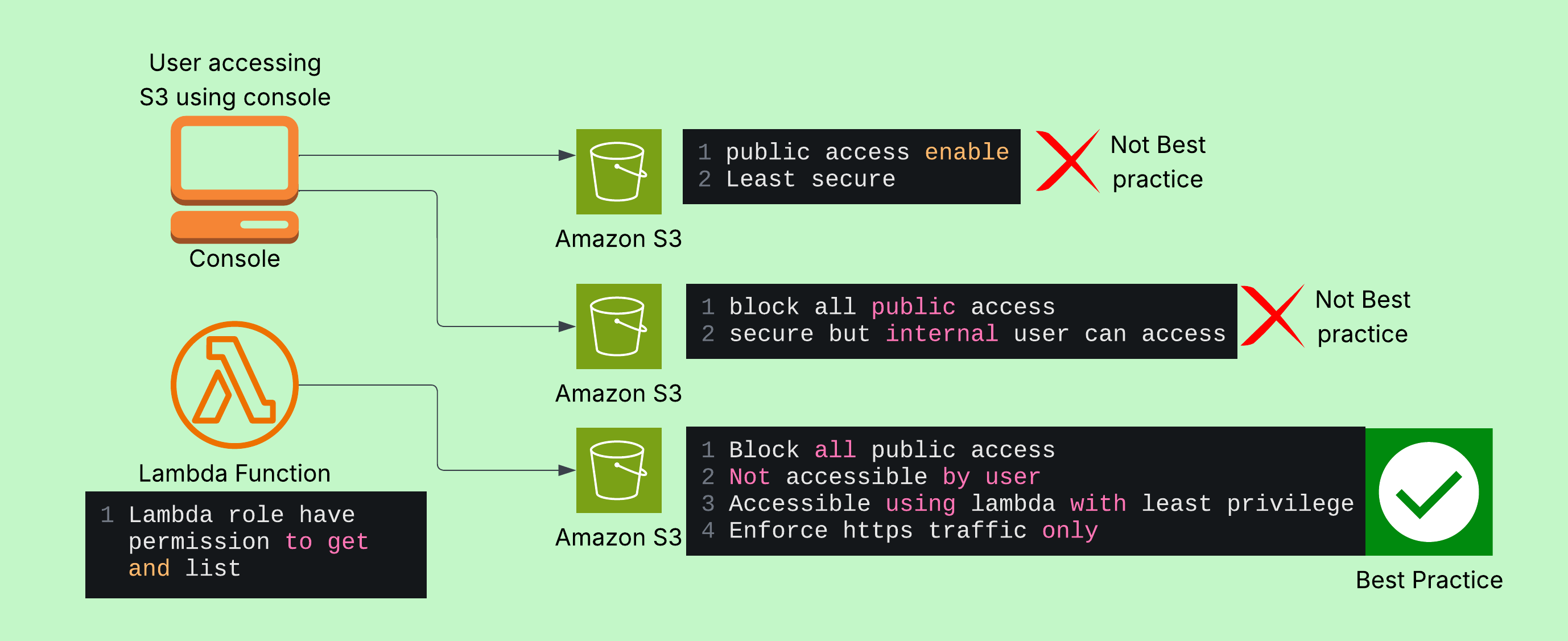
Security progression
- Remove public access. I enabled S3 Block Public Access so anonymous users could no longer retrieve objects through public URLs. Testing the original object URL changed the result from exposed content to
403 Forbidden. - Apply least privilege. I replaced the permissive
Principal: "*"bucket policy with a policy scoped to the Lambda execution role. Direct access from CloudShell was denied, while the intended application principal retained read access. - Use an IAM role. The demo Lambda function uses an execution role limited to
s3:GetObjectands3:ListBucketfor the challenge bucket. It can list the sample folder and read a test object without distributing long-lived credentials. - Enforce HTTPS. A bucket-policy deny condition on
aws:SecureTransportblocks requests made over unencrypted transport. This protects data while it moves between clients, AWS services, and the bucket. - Encrypt at rest. I configured default bucket encryption with SSE-KMS. New objects are encrypted automatically, and an S3 Bucket Key can reduce the number of KMS requests and their associated cost.
Policy design
The final design uses explicit denies for the conditions that must never be true, followed by a narrow allow for the application role. In a real deployment, the bucket name, account ID, role ARN, and KMS key ARN would be supplied from infrastructure configuration rather than copied into a public document.
- Block Public Access: prevents accidental public ACLs and public bucket-policy access.
- Bucket policy: controls which principals can reach this bucket and denies insecure transport.
- IAM role policy: limits what the Lambda function can do and which bucket resources it can read.
- SSE-KMS: protects object data at rest with a managed encryption key.
Validation
I validated the controls from two different access paths:
- CloudShell access to the sample object returned
AccessDenied, confirming that a human session could not bypass the application boundary. - The demo Lambda test completed successfully, proving that the approved role could still list and read the required S3 data.
This contrast demonstrates defense in depth: S3 resource policy and IAM identity policy work together, while transport and encryption controls protect the data across its lifecycle.
Best practices
The core challenge controls protect access and data, but a production bucket also needs resilience, governance, and ongoing visibility.
Official AWS guidance: Amazon S3 security best practices
- Enable versioning early. Versioning preserves earlier object versions so accidental overwrites and deletes can be recovered. See the AWS S3 Versioning documentation for lifecycle considerations.
- Use lifecycle policies. Transition older versions to lower-cost storage or expire them according to retention requirements. Lifecycle rules keep versioning from creating uncontrolled storage costs. See Managing your storage lifecycle.
- Consider Object Lock. For regulated or backup data, retention modes and legal holds can prevent objects from being deleted or overwritten before their retention period ends. Read the AWS S3 Object Lock documentation.
- Prefer private service access. Use an S3 VPC endpoint for workloads inside a VPC so requests can stay on the AWS network instead of traversing the public internet. AWS documents this under Amazon S3 VPC endpoints.
- Audit and monitor access. Use CloudTrail data events for object-level activity and CloudWatch metrics or alarms to identify unusual request patterns and failed access attempts. See Logging Amazon S3 API calls using AWS CloudTrail.
- Keep permissions narrow. Avoid wildcard actions and resources in production policies. Grant only the actions, prefixes, principals, and conditions each workload requires.
Key takeaway: S3 security is not one checkbox. Public access controls, explicit resource policies, least-privilege IAM roles, HTTPS-only transport, and encryption at rest reinforce one another.
Related project: AWS Cloud Resume ChallengeOfficial AWS reference: Security best practices for Amazon S3